Loading...
Loading...
Loading...
Loading...
Loading...
Loading...
Loading...
Loading...
Loading...
Loading...
Loading...
Loading...
Loading...
Loading...
Loading...
Loading...
Loading...
Loading...
Loading...
Loading...
Loading...
Loading...
Loading...
Loading...
Loading...
Loading...
The last option under System Settings is Discharge Speed Control. This contains all settings pertaining to the discharge speed and the settings associated with the different modes of discharge.
On the bottom of the Discharge Speed Control page are the three discharge modes to toggle between. Each discharge mode has a separate set of settings.
The charts on the following pages show the discharge speed in 10% increments with the corresponding bu/hour, tonnes/hour, VFD Frequency and Metering Speed for each dryer model.
Regardless of which discharge mode settings page is displayed, the operator can change the discharge mode from any one of them. However, it is important to understand that in order to change discharge modes, the operator must be in Manual mode first before changing to any of the other available modes. For instance, if the dryer is currently discharging in AccuDry mode and the operator wants to change to TruDry mode, the operator must first select Manual mode, and then select TruDry mode.
In addition to being able to select the mode of discharge from any of these pages, the Manual, TruDry and AccuDry Settings pages also all contain the same information for the following tiles: Disch Speed, Disch Speed Alarms, and Mid-Grain Temperature Alarms.
When discharging in Manual mode, the operator controls the speed at which the grain discharges at. This adjustable value is under the Manual Settings tile, next to the Set Discharge Speed, input box.
Each dryer model has a discharge capacity for every revolution of the metering rolls for profile dryers and sweep for tower dryers. These discharge capacities are used to calculate how much grain is being discharged from the dryer given a specific discharge speed. The chart below shows what these discharge capacities are in bushels per revolution and cubic meters per revolution.
L1000 - L6000
3.667
0.1292
D600 / D600h
2.433
0.0857
D900 / D900h - D2400 / D2400h
3.667
0.1292
D3200 / D3200h
4.889
0.1723
F320 / F320x
2.433
0.0857
F480 / F480x - F660 / F660x
3.667
0.1292
E300 / E300h
1.825
0.0643
E400 / E400h
2.433
0.0857
E500 / E500h
3.042
0.1072
E600 / E600h
3.667
0.1292
E700 / E700h
4.278
0.1507
10530
5.000
0.1786
10740
7.000
0.2500
10950
9.000
0.3214
101160
11.000
0.3929
101375
13.000
0.4643
12-20-100
10.000
0.35714
12-24-125
12.000
0.4286
12-28-150
14.000
0.4934
3000
40.000
1.4286
3500
45.000
1.6071
4000
50.000
1.7857
4800
55.000
1.9643
The AccuDry Settings page is very similar to the Manual Settings page as well. The only difference, other than the component quick launches, is the "Set Discharge Speed" box displayed on the Manual Settings page has been replaced by values and information pertaining to AccuDry.
To understand the settings on the AccuDry Settings page, it is best to first have a good understanding of the AccuDry Technology and how AccuDry works.

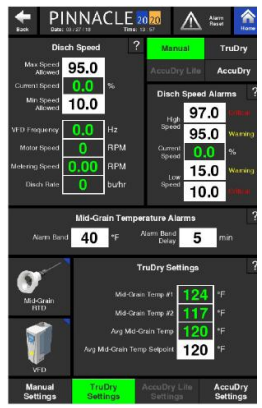
Since the speed of the discharge impacts the mid-grain temperature, it is on any of these discharge settings pages where the operator can set the mid-grain temperature alarm limits. If the dryer is discharging and the mid-grain temperature exceeds the mid-grain temperature alarm band for a set period of time, the dryer will enter a Cool Down mode. The two alarm limits that can be entered that pertain to the mid-grain temperature are the Alarm Band and Alarm Band Delay.
The Mid-Grain Temperature Alarm Band is the allowed deviation from the mid-grain temperature set point while the discharge system is running.
The Mid-Grain Alarm Band Delay is a user-defined time duration in minutes that will delay the Cool Down of the dryer after the Mid-Grain Band warning alarm has occurred. If the Mid-Grain temperature returns to the acceptable range within this time period, no shut down will occur.
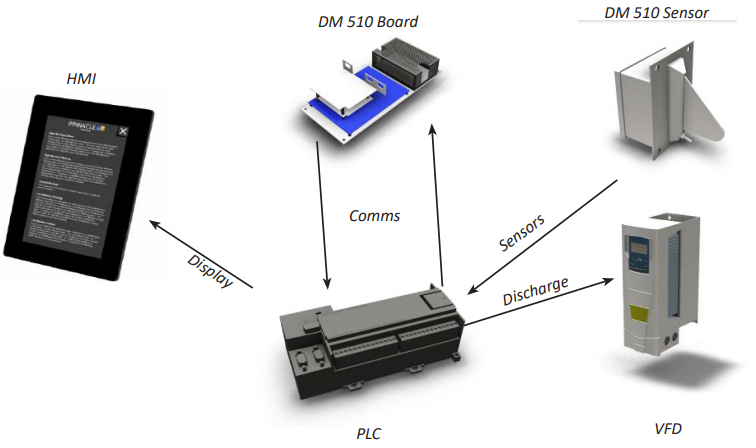
AccuDry technology utilizes the Dryer Moisture Systems Dryer Master DM510 system. The DM510 system uses specially designed in-line moisture and temperature sensors located at both the infeed and discharge of the dryer. These sensors provide continuous moisture and temperature readings to the PLC, which is shared with the DM510 logic board.
The DM510 board uses this information to build an operating model of your dryer. As infeed moistures and drying conditions change throughout the day; AccuDry continuously calculates and automatically adjusts to the optimum discharge rate for current conditions.
AccuDry has two important advantages. First, in automatic mode, it can continually watch the dryer. It does not have to help unload trucks, load trains, or do any other jobs around the elevator that a normal dryer operator does throughout the day. The dryer receives the user's full attention.
Second, it has the benefit of continuous moisture information from both the infeed and discharge of the dryer, giving it a complete picture of all the grain in the dryer, and the grain exiting the dryer.
With this information, AccuDry does not have to wait to react to changes in the outlet moisture. It is able to adjust the discharge rate as the incoming moisture changes. For example, as wetter grain comes into the dryer, AccuDry begins to slow down the discharge rate just as the wetter grain reaches the hot zone.
The AccuDry mode of operation utilizes input signals from both the discharge moisture sensor and the infeed moisture sensor to control the dryer's discharge rate. When the AccuDry mode of operation is available, it will display it's corresponding toggle button under the TruDry button. Also, when on the AccuDry Settings page, an input will be made available which allows the operator to enter the target discharge moisture setpoint.
When running in AccuDry, similar to the guidelines that were provided for TruDry, the minimum and maximum discharge speed Operational Limits are important to the controller's operation. The AccuDry control algorithm will attempt to speed up and slow down the discharge to maintain the discharge moisture setpoint, and the amount of room that the controller has to work with is determined by the minimum and maximum speed setpoints. For example if the min/max speed setpoints are 10% - 100%, the range of speed output from the controller will be higher, which means the rate at which the speed changes will be higher. On the other hand, if the min/max setpoints are 30% - 75%, the controller can only operate within that band and only has a range of 45% to work with.
Similar to how the mid-grain temperature setpoint (used in TruDry) can be changed while in manual mode, so too can the discharge moisture setpoint (used in AccuDry) be changed while in manual mode. The only limitation is that the operator cannot change the discharge speed setpoint when running in TruDry or AccuDry.
In order to effectively use the AccuDry mode of operation, it is important to allow the dryer to get to a steady state operating condition for 2-3 hours upon initial installation (depending on the size of the machine and the incoming grain moisture) with a desirable and consistent discharge moisture output. Once this steady state condition has been met, the operator will confirm the discharge moisture setpoint that is desired and make any required changes. Also, be sure the minimum and maximum discharge speed Operational Limits are set to an accurate band.
The AccuDry system will remember grain moistures upon startup from the previous shutdown. For example, if the dryer was discharging 15.5% moisture the night prior, and start up with 15.4% the following morning, the system will allow quick entry into AccuDry mode.
If the discharge moisture is significantly different from the previous operations moisture, the system will not enable AccuDry until it has gathered sufficient information to run correctly and efficiently.
It is advised not to change the status of the burners while operating in AccuDry mode. Instead, change to manual discharge mode first, change the burners to off/on, then get back into AccuDry.
1,054
24.6
L3000 L4000 L5000 L6000
9.6
2,109
49.1
E300 / E300h
3.4
375
8.7
E400 / E400h
3.4
500
11.6
E500 / E500h
3.4
625
14.6
E600 / E600h
3.4
753
17.5
E700 / E700h
3.4
879
20.5
D600 / D600h
4.8
699
16.3
D900 / D900h
4.8
1,054
24.6
D1200 / D1200h
6.0
1,318
30.7
D1500 / D1500h
7.2
1,581
36.8
D1800 / D1800h
8.6
1,898
44.2
D2100 / D2100h
9.6
2,109
49.1
D2400 / D2400h
11.5
2,530
58.9
D3200 / D3200h
11.5
3,373
78.6
F320 / F320x
4.8
699
16.3
F480 / F480x
4.8
1,054
24.6
F660 / F660x
7.2
1,581
36.8
10530
3.5
1,054
24.6
10740
3.5
1,476
34.4
10950
3.5
1,898
44.2
101160
3.5
2,319
54.0
101375
3.5
2,741
63.8
12-20-100
3.5
2,108
49.1
12-24-125
3.5
2,530
58.9
12-28-150
3.5
2,952
68.8
3000
1.3
3,022
70.4
3500
1.3
3,399
79.2
4000
1.3
3,777
88.0
4800
1.3
4,155
96.8
From any of these discharge settings pages (Manual, TruDry, or AccuDry Settings pages), in the Disch Speed tile, the operator can set operational limits that pertain to the discharge speed. The two operational limits the operator can set are the max and min speeds the discharge can run at. With the operational limits in place, the user will not be able to enter a speed in the Set Discharge Speed box of the Manual Settings page that exceeds these limits.
The lowest allowable min limit that can be entered is 10%.
Again, from any of these discharge settings pages, under Disch Speed Alarms, the operator can set alarm limits that pertain to the discharge speed. There are two types limits: high limits and low limits. There also two types of alarms: warning alarms and critical alarms. If a warning alarm limit is exceeded, the control will trigger a warning message to be displayed on the HMI screens. If that particular reading continues further off course and exceeds the critical alarm limit, the dryer will shutdown and a critical alarm message will appear on the HMI screens.
If the Current Speed exceeds the value entered for the High Speed Critical value, the dryer will shut down. The input value for this High Speed Critical alarm must be equal to or greater than the value entered for the High Speed Warning value. To expand the allowable input range for the High Speed Critical value, the High Speed Warning value may first need to be adjusted.
If the Current Speed exceeds the value entered for the High Speed Warning value, the control will display a High Speed warning message. The input value for this High Speed Warning alarm must be equal to or less than the value entered for the High Speed Critical value. The lowest value allowed for this warning is equal to the Low Speed Warning value. To expand the allowable input range for the High Speed Warning value, the High Speed Critical and Low Speed Warning values may first need to be adjusted.
This value is the real time metering speed of the discharge system.
If the Current Speed falls below the value entered for the Low Speed Warning, the control will display a Low Speed warning message. The input value for this Low Speed Warning alarm must be equal to or less than the value entered for the High Speed Warning value. The lowest value allowed for this warning is equal to the Low Speed Critical value. To expand the allowable input range for the Low Speed Warning value, the High Speed Warning and Low Speed Critical values may first need to be adjusted.
If the Current Speed falls below the value entered for the Low Speed Critical, the dryer will shut down. The input value for this Low Speed Critical alarm must be equal to or lower than the value entered for the Low Speed Warning value. To expand the allowable input range for the Low Speed Critical value, the Low Speed Warning value may first need to be adjusted.
29.5
L3000 L4000 L5000 L6000
11.5
2,530
58.9
E300 / E300h
4.1
450
10.5
E400 / E400h
4.1
600
14.0
E500 / E500h
4.1
750
17.5
E600 / E600h
4.1
904
21.0
E700 / E700h
4.1
1,054
24.6
D600 / D600h
5.8
839
19.6
D900 / D900h
5.8
1,265
29.5
D1200 / D1200h
7.2
1,581
36.8
D1500 / D1500h
8.6
1,898
44.2
D1800 / D1800h
10.4
2,277
53.0
D2100 / D2100h
11.5
2,530
58.9
D2400 / D2400h
13.8
3,036
70.7
D3200 / D3200h
13.8
4,048
94.3
F320 / F320x
5.8
839
19.6
F480 / F480x
5.8
1,265
29.5
F660 / F660x
8.6
1,898
44.2
10530
4.2
1,265
29.5
10740
4.2
1,771
41.3
10950
4.2
2,277
53.0
101160
4.2
2,783
64.8
101375
4.2
3,289
76.6
12-20-100
4.2
2,530
58.9
12-24-125
4.2
3,036
70.7
12-28-150
4.2
3,542
82.5
3000
1.5
3,626
84.5
3500
1.5
4,079
95.0
4000
1.5
4,532
105.6
4800
1.5
4,986
116.1
L1000 L1500 L2000
5.8
1,265
211
4.9
L3000 L4000 L5000 L6000
1.9
422
9.8
E300 / E300h
0.7
75
1.7
E400 / E400h
0.7
100
2.3
E500 / E500h
0.7
125
2.9
E600 / E600h
0.7
151
3.5
E700 / E700h
0.7
176
4.1
D600 / D600h
1.0
140
3.3
D900 / D900h
1.0
211
4.9
D1200 / D1200h
1.2
264
6.1
D1500 / D1500h
1.4
316
7.4
D1800 / D1800h
1.7
380
8.8
D2100 / D2100h
1.9
422
9.8
D2400 / D2400h
2.3
506
11.8
D3200 / D3200h
2.3
675
15.7
F320 / F320x
1.0
140
3.3
F480 / F480x
1.0
211
4.9
F660 / F660x
1.4
316
7.4
10530
0.7
211
4.9
10740
0.7
295
6.9
10950
0.7
380
8.8
101160
0.7
464
10.8
101375
0.7
548
12.8
12-20-100
0.7
422
9.8
12-24-125
0.7
506
11.8
12-28-150
0.7
590
13.8
3000
0.3
604
14.1
3500
0.3
680
15.8
4000
0.3
755
17.6
4800
0.3
831
19.4
Depending on the model dryer, the % discharge speed will correspond to an approximate bu/hr or metric tonnes/hr value for a known discharge capacity. The table below correlates discharge speed % to bu/hr based for the moisture removal (5pt or 10pt) and mode of operation (All-Heat or Heat+Cool) stated above.
L1000
1,270
30.3
60%
L1500
The TruDry Settings page is very similar to the Manual Settings page. The only difference, other than the component quick launches, is the "Set Discharge Speed" box displayed on the Manual Settings page has been replaced by mid-grain temperature boxes.
To understand the settings on the TruDry Settings page, it is best to first have a good understanding of how TruDry works.
TruDry is the name of a temperature based discharge mode of operation that automatically increases or decreases the discharge speed of the dryer. TruDry is not an automatic moisture control mode of operation and does not utilize the discharge moisture value, but instead controls the discharge rate by attempting to maintain an average mid-grain temperature setpoint. The mid-grain temperature is the temperature of the grain, measured approximately halfway down the heat zone of the dryer, and halfway into the grain column by an RTD (resistive temperature device). There are two RTD's, on opposite sides of the dryer, measuring the grain temperature. These two temperatures are used to calculate the average mid-grain temperature. The principal of operation is that as the grain entering the dryer increases in moisture, the mid-grain temperature will go down and when the grain entering the dryer decreases in moisture, the mid-grain temperature will go up. Therefore, what the controller will do is utilize a negative responding Proportional-Integral-Derivative (PID) control loop which will increase the discharge rate when the mid-grain temperature goes up and decrease the discharge rate when the mid-grain temperature goes down. This essentially means that as the grain's moisture goes up, the dryer will slow down and as the grain's moisture goes down, the dryer will speed up.
1,898
44.2
L3000 L4000 L5000 L6000
17.3
3,795
88.4
E300 / E300h
6.2
675
15.7
E400 / E400h
6.2
899
20.9
E500 / E500h
6.2
1,124
26.2
E600 / E600h
6.2
1,355
31.6
E700 / E700h
6.2
1,581
36.8
D600 / D600h
8.6
1,259
29.3
D900 / D900h
8.6
1,898
44.2
D1200 / D1200h
10.8
2,372
55.3
D1500 / D1500h
12.9
2,847
66.3
D1800 / D1800h
15.5
3,416
79.6
D2100 / D2100h
17.3
3,795
88.4
D2400 / D2400h
20.7
4,554
106.1
D3200 / D3200h
20.7
6,072
141.4
F320 / F320x
8.6
1,259
29.3
F480 / F480x
8.6
1,898
44.2
F660 / F660x
12.9
2,847
66.3
10530
6.3
1,898
44.2
10740
6.3
2,657
61.9
10950
6.3
3,416
79.6
101160
6.3
4,175
97.2
101375
6.3
4,934
114.9
12-20-100
6.3
3,795
88.4
12-24-125
6.3
4,554
106.1
12-28-150
6.3
5,313
123.8
3000
2.3
5,439
126.7
3500
2.3
6,119
142.5
4000
2.3
6,799
158.4
4800
2.3
7,478
174.2
1,830
43.7
87%
L2000
2,220
53.0
100%
L3000
3,060
73.0
73%
L4000
3,910
93.3
93%
L5000
4,770
113.8
100%
L6000
5,600
133.7
100%
D600h
1,070
25.5
76%
D900h
1,640
39.1
78%
D1200h
2,120
50.6
80%
D1500h
2,600
62.1
82%
D1800h
3,080
73.5
81%
D2100h
3,560
85.0
84%
D2400h
4,040
96.4
80%
D3200h
5,420
129.4
80%
E300 / E300h
550
13.1
73%
E400 / E400h
730
17.4
73%
E500 / E500h
910
21.7
73%
E600 / E600h
1,100
26.3
73%
E700 / E700h
1,280
30.5
73%
F320
965
23.0
69%
F320x
1,315
31.4
94%
F480
1,455
34.7
69%
F480x
1,960
46.8
93%
F660
1,960
46.8
62%
F660x
2,660
63.5
84%
34.4
L3000 L4000 L5000 L6000
13.4
2,952
68.8
E300 / E300h
4.8
525
12.2
E400 / E400h
4.8
699
16.3
E500 / E500h
4.8
875
20.4
E600 / E600h
4.8
1,054
24.6
E700 / E700h
4.8
1,230
28.6
D600 / D600h
6.7
979
22.8
D900 / D900h
6.7
1,476
34.4
D1200 / D1200h
8.4
1,845
43.0
D1500 / D1500h
10.1
2,214
51.6
D1800 / D1800h
12.1
2,657
61.9
D2100 / D2100h
13.4
2,952
68.8
D2400 / D2400h
16.1
3,542
82.5
D3200 / D3200h
16.1
4,723
110.0
F320 / F320x
6.7
979
22.8
F480 / F480x
6.7
1,476
34.4
F660 / F660x
10.1
2,214
51.6
10530
4.9
1,476
34.4
10740
4.9
2,066
48.1
10950
4.9
2,657
61.9
101160
4.9
3,247
75.6
101375
4.9
3,837
89.4
12-20-100
4.9
2,952
68.8
12-24-125
4.9
3,542
82.5
12-28-150
4.9
4,133
96.3
3000
1.8
4,230
98.5
3500
1.8
4,759
110.9
4000
1.8
5,288
123.2
4800
1.8
5,817
135.5
L1000 L1500 L2000
6.7
1,476
39.3
L3000 L4000 L5000 L6000
15.3
3,374
78.6
E300 / E300h
5.5
600
14.0
E400 / E400h
5.5
799
18.6
E500 / E500h
5.5
1,000
23.3
E600 / E600h
5.5
1,205
28.1
E700 / E700h
5.5
1,406
32.7
D600 / D600h
7.7
1,119
26.1
D900 / D900h
7.7
1,687
39.3
D1200 / D1200h
9.6
2,109
49.1
D1500 / D1500h
11.5
2,530
58.9
D1800 / D1800h
13.8
3,036
70.7
D2100 / D2100h
15.3
3,374
78.6
D2400 / D2400h
18.4
4,048
94.3
D3200 / D3200h
18.4
5,397
125.7
F320 / F320x
7.7
1,119
26.1
F480 / F480x
7.7
1,687
39.3
F660 / F660x
11.5
2,530
58.9
10530
5.6
1,687
39.3
10740
5.6
2,361
55.0
10950
5.6
3,036
70.7
101160
5.6
3,711
86.4
101375
5.6
4,386
102.2
12-20-100
5.6
3,373
78.6
12-24-125
5.6
4,048
94.3
12-28-150
5.6
4,723
110.0
3000
2.0
4,835
112.6
3500
2.0
5,439
126.7
4000
2.0
6,043
140.8
4800
2.0
6,647
154.8
L1000 L1500 L2000
7.7
1,687
14.7
L3000 L4000 L5000 L6000
5.8
1,265
29.5
E300 / E300h
2.1
225
5.2
E400 / E400h
2.1
300
7.0
E500 / E500h
2.1
375
8.7
E600 / E600h
2.1
452
10.5
E700 / E700h
2.1
527
12.3
D600 / D600h
2.9
420
9.8
D900 / D900h
2.9
633
14.7
D1200 / D1200h
3.6
791
18.4
D1500 / D1500h
4.3
949
22.1
D1800 / D1800h
5.2
1,139
26.5
D2100 / D2100h
5.8
1,265
29.5
D2400 / D2400h
6.9
1,518
35.4
D3200 / D3200h
6.9
2,024
47.1
F320 / F320x
2.9
420
9.8
F480 / F480x
2.9
633
14.7
F660 / F660x
4.3
949
22.1
10530
2.1
633
14.7
10740
2.1
886
20.6
10950
2.1
1,139
26.5
101160
2.1
1,392
32.4
101375
2.1
1,645
38.3
12-20-100
2.1
1,265
29.5
12-24-125
2.1
1,518
35.4
12-28-150
2.1
1,771
41.3
3000
0.8
1,813
42.2
3500
0.8
2,040
47.5
4000
0.8
2,266
52.8
4800
0.8
2,493
58.1
L1000 L1500 L2000
2.9
633
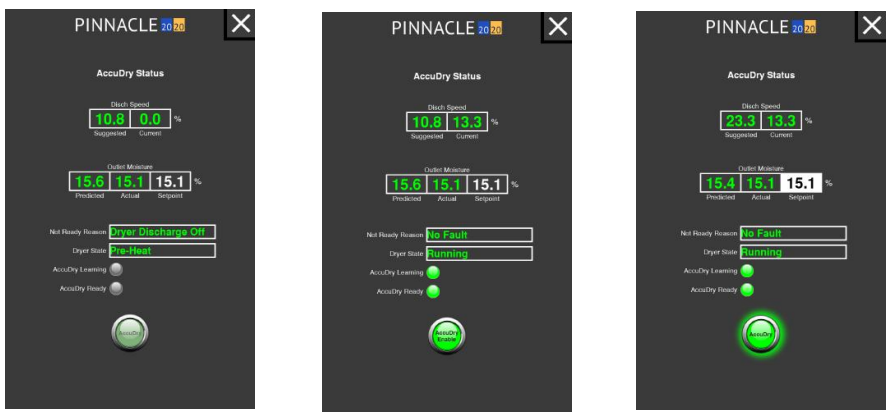
By default, the dryer will not have enough information to jump right into AccuDry mode and the AccuDry button will appear grayed out. In order for AccuDry to be "Ready," the system must achieve the following before it will allow the dryer to enter AccuDry mode:
There must not be any alarms present;
The dryer must be in the "Running" state of operation, further explanation may be found below;
The Actual Discharge Rate must be within 5% of the Suggested Rate;
The Discharge Moisture must be within 2% of the Setpoint Moisture and;
The AccuDry system must have enough knowledge and runtime, to have a Predicted Discharge Moisture within 2% of the Actual Discharge Moisture.
Attempting to enter AccuDry Mode, whether ready or not, by pressing the AccuDry button from any of the discharge settings pages, will cause an AccuDry Status screen to appear as shown below.
This screen will appear slightly different depending on the state of the AccuDry model. The items displayed on this screen are the dryer running state, the not ready reason, the AccuDry predicted discharge moisture, the actual measured discharge moisture, the AccuDry suggested rate, the actual discharge rate, and whether or not the DM510 board is recording data (AccuDry Learning). This screen will provide information to better achieve AccuDry readiness, and will get the dryer into AccuDry much faster than guess work in Manual mode.
On the AccuDry Status screen, the Learn mode will be illuminated when the dryer is operating (discharge is ON), and the moisture sensors have product being detected. This indicator states that the AccuDry system is "learning" from it's current operating inputs, and will stop "learning" and saving data when the discharge is turned OFF. Lastly is AccuDry mode, for when you are running in AccuDry mode.
The dryer state field indicates the seven (7) stages of operating your dryer. The seven states are as follows:
Stand-By
The dryer fans, discharge, and burner(s) are off. The dryer may not be full (no moisture displayed by the infeed moisture sensor).
Primed
The dryer fans, discharge, and burner(s) are off. The dryer is full (moisture displayed by the infeed moisture sensor).
Idle Running
The dryer fans, discharge, and burner(s) are off. The dryer is full (moisture displayed by the infeed moisture sensor). This feature is only available on systems that make use of the fan switch input.
Shutdown
The dryer is OFF. The fans, the discharge, and burner(s) are off. The dryer is full (moisture displayed by the infeed moisture sensor). This feature is only available on systems that make use of the fan switch input.
Preheat
The dryer fans are on, the burner(s) are on, the discharge is off. The dryer is full (moisture displayed by the infeed moisture sensor).
Running
The dryer fans are on, the burner(s) are on, the discharge is on. The dryer is full (moisture displayed by the infeed moisture sensor). Moisture is displayed at the discharge sensor.
The not ready field indicates the reason the dryer will not allow entry into AccuDry mode:
Discharge Off
The discharge is off and must be turned on.
Drying Temp Critical
Plenum temperature is in alarm and must be corrected.
Inlet Moisture Critical
Inlet grain moisture is in alarm and must be corrected.
Outlet Moisture Critical
Discharge grain moisture is in alarm and must be corrected.
Inlet Temperature Critical
Inlet grain temperature is in alarm and must be corrected.
Outlet Temperature Critical
Discharge grain temperature is in alarm and must be corrected.
The suggested rate field indicates what the AccuDry system would run at that given moment if it were to take over controls of the VFD. It is important to note that this field updates regularly, and will become more and more accurate as the dryer learns for each individual grain type.
The actual rate field indicates the real-time commanded speed from the PLC to the VFD.
While running in manual when the AccuDry button text will change from gray to white, AccuDry reaches the "Ready" state. Pressing the AccuDry button will again cause the AccuDry status screen to appear. When AccuDry is selected from this screen, the button will flash "Enabling..." for a few seconds and will illuminate the AccuDry text in green lettering; the dryer is now in AccuDry mode.
Once AccuDry mode of operation has been selected, the ability to manually change the speed will be inhibited and the only parameter that can be adjusted will be the discharge moisture setpoint. While running in AccuDry, the speed will continuously increase or decrease to maintain the target discharge moisture setpoint. Do not continuously tweak the discharge moisture setpoint, let it try to control to the setpoint value that was previously established.
The following steps should be included in the daily routine when using the AccuDry system:
Before dryer start-up, check the outlet moisture sensor to ensure it is clean and free of debris. The sensor chute has no obstructions ahead of the sensor, and the flow-metering device is operating.
Start the dryer as has been done in the past from the dryer control panel. The Pinnacle 20|20 software will indicate the dryer is in "Manual" mode.
On the Dryer Overview screen, verify the discharge rate and discharge moisture setpoints. Modify them accordingly.
After the normal fan and burner startup procedure, as outlined in the Operations Manual, begin discharging.
AccuDry can be selected when the AccuDry button is illuminated white. Begin running in AccuDry and double-check the discharge moisture setpoint (now the only setpoint able to be changed) is correct.
AccuDry will now automatically adjust the dryer discharge rate to achieve the displayed product target moisture.
Periodically check the moisture sensors to ensure they are clean and there is good product flow. Metering may be turned off for roughly 60 seconds to clear out any fines or bees wings that may have accumulated in the sampling chute.
While operating the dryer, calibrate the moisture sensors as required.
When dryer discharge is turned off, AccuDry will automatically revert to "Manual” mode after 25 minutes.
In order to effectively use the TruDry mode of operation, it is important to allow the dryer to get to a steady state operating condition for 2-3 hours (depending on the size of the machine and the incoming grain moisture) with a desirable and consistent discharge moisture output. Once this steady state condition has been met, the operator will want to set the mid-grain temperature setpoint to a value equal to the current actual mid-grain temperature. Note that although the dryer is running in manual, the operator will still be able to change the mid-grain temperature setpoint via the TruDry Settings page.
At this point, the dryer has been running for 2-3 hours and steady state has been reached, so the current reading for the actual mid-grain temperature should correspond to the desired grain moisture that is currently being discharged from the dryer. It is important to understand that TruDry is not controlling the dryer based on discharge moisture, but rather indirectly based on the average mid-grain temperature.
Another step to ensure a smooth and successful transition from manual mode to TruDry is to verify the minimum and maximum discharge speed Operational Limits are set to reasonable values. When running in TruDry mode this is especially important because the TruDry control algorithm will attempt to speed up and slow down to maintain the mid-grain temperature setpoint, and the amount of room that the controller has to work with is determined by the minimum and maximum speed setpoints. For example, if the min/max speed setpoints are 10% - 100%, the range of speed output from the controller will be higher, which means the rate at which the speed changes will be higher. On the other hand, if the min/max setpoints are 30% - 75%, the controller can only operate within that band and only has a range of 45% to work with. A table of suggested minimum and maximum values is shown below.
E300 - E700
25% Min, 75% Max
10% Min, 55% Max
E300h - E700h
25% Min, 75% Max
N/A
L1000 - L6000
20% Min, 80% Max
10% Min, 55% Max
D600 - D3200
N/A
Once the average mid-grain temperature setpoint has been set and the minimum and maximum speed range has been established, TruDry mode of operation can be selected by touching the TruDry button in the upper right corner of any of the discharge settings pages. Once TruDry mode of operation has been selected, the ability to manually change the speed will be inhibited and the only parameter that can be adjusted will be the mid-grain temperature setpoint.
While running in TruDry, the speed will continuously increase or decrease to maintain the target mid-grain temperature. Do not continuously tweak the mid-grain temperature, let it try to control to the setpoint value that you previously established. TruDry should be able to handle 3-5% swings in incoming moisture with reasonable discharge moisture variation if the dryer was properly brought up to steady state as previously explained. If after running for an extended period of time and it has been determined that the target mid-grain temperature is too high or too low, minor adjustments can be made, but should only be done periodically, not continuously. If the operator wants to meticulously control the dryer, then the dryer should be run in the manual mode of operation where the operator can directly control the dryer's discharge rate.
Depending on the model dryer, the % discharge speed will correspond to an approximate bu/hr or metric tonnes/hr value for a known discharge capacity. The table below correlates discharge speed % to bu/hr based for the moisture removal (5pt or 10pt) and mode of operation (All-Heat or Heat+Cool) stated above.
L1000
600
14.3
28%
L1500
880
21.0
42%
L2000
1,040
24.8
49%
L3000
1,460
34.8
35%
L4000
1,860
44.4
44%
L5000
2,280
54.4
54%
L6000
2,680
64.0
64%
D600h
520
12.4
37%
D900h
790
18.9
37%
D1200h
1,030
24.6
39%
D1500h
1,260
30.1
40%
D1800h
1,490
35.6
39%
D2100h
1,720
41.1
41%
D2400h
1,950
46.5
39%
D3200h
2,620
62.5
39%
E300 / E300h
270
6.4
36%
E400 / E400h
360
8.6
36%
E500 / E500h
445
10.6
36%
E600 / E600h
535
12.8
36%
E700 / E700h
625
14.9
36%
F320
465
11.1
33%
F320x
640
15.3
46%
F480
700
16.7
33%
F480x
950
22.7
45%
F660
950
22.7
30%
F660x
1,295
30.9
41%
422
9.8
L3000 L4000 L5000 L6000
3.8
843
19.6
E300 / E300h
1.4
150
3.5
E400 / E400h
1.4
200
4.7
E500 / E500h
1.4
250
5.8
E600 / E600h
1.4
301
7.0
E700 / E700h
1.4
351
8.2
D600 / D600h
1.9
280
6.5
D900 / D900h
1.9
422
9.8
D1200 / D1200h
2.4
527
12.3
D1500 / D1500h
2.9
633
14.7
D1800 / D1800h
3.5
759
17.7
D2100 / D2100h
3.8
843
19.6
D2400 / D2400h
4.6
1,012
23.6
D3200 / D3200h
4.6
1,349
31.4
F320 / F320x
1.9
280
6.5
F480 / F480x
1.9
422
9.8
F660 / F660x
2.9
633
14.7
10530
1.4
422
9.8
10740
1.4
590
13.8
10950
1.4
759
17.7
101160
1.4
928
21.6
101375
1.4
1,096
25.5
12-20-100
1.4
843
19.6
12-24-125
1.4
1,012
23.6
12-28-150
1.4
1,181
27.5
3000
0.5
1,209
28.2
3500
0.5
1,360
31.7
4000
0.5
1,511
35.2
4800
0.5
1,662
38.7
843
19.6
L3000 L4000 L5000 L6000
7.7
1,687
39.3
E300 / E300h
2.7
300
7.0
E400 / E400h
2.7
400
9.3
E500 / E500h
2.7
500
11.6
E600 / E600h
2.7
602
14.0
E700 / E700h
2.7
703
16.4
D600 / D600h
3.8
560
13.0
D900 / D900h
3.8
843
19.6
D1200 / D1200h
4.8
1,054
24.6
D1500 / D1500h
5.8
1,265
29.5
D1800 / D1800h
6.9
1,518
35.4
D2100 / D2100h
7.7
1,687
39.3
D2400 / D2400h
9.2
2,024
47.1
D3200 / D3200h
9.2
2,699
62.9
F320 / F320x
3.8
560
13.0
F480 / F480x
3.8
843
19.6
F660 / F660x
5.8
1,265
29.5
10530
2.8
843
19.6
10740
2.8
1,181
27.5
10950
2.8
1,518
35.4
101160
2.8
1,855
43.2
101375
2.8
2,193
51.1
12-20-100
2.8
1,687
39.3
12-24-125
2.8
2,024
47.1
12-28-150
2.8
2,361
55.0
3000
1.0
2,417
56.3
3500
1.0
2,719
63.3
4000
1.0
3,022
70.4
4800
1.0
3,324
77.4
2,109
49.1
L3000 L4000 L5000 L6000
19.2
4,217
98.2
E300 / E300h
6.8
750
17.5
E400 / E400h
6.8
999
23.3
E500 / E500h
6.8
1,249
29.1
E600 / E600h
6.8
1,506
35.1
E700 / E700h
6.8
1,757
40.9
D600 / D600h
9.6
1,399
32.6
D900 / D900h
9.6
2,109
49.1
D1200 / D1200h
12.0
2,636
61.4
D1500 / D1500h
14.4
3,163
73.7
D1800 / D1800h
17.3
3,795
88.4
D2100 / D2100h
19.2
4,217
98.2
D2400 / D2400h
23.0
5,060
117.9
D3200 / D3200h
23.0
6,747
157.2
F320 / F320x
9.6
1,399
32.6
F480 / F480x
9.6
2,109
49.1
F660 / F660x
14.4
3,163
73.7
10530
7.0
2,108
49.1
10740
7.0
2,952
68.8
10950
7.0
3,795
88.4
101160
7.0
4,639
108.0
101375
7.0
5,482
127.7
12-20-100
7.0
4,217
98.2
12-24-125
7.0
5,060
117.9
12-28-150
7.0
5,904
137.5
3000
2.5
6,043
140.8
3500
2.5
6,799
158.4
4000
2.5
7,554
176.0
4800
2.5
8,309
193.5
Holding
The dryer fans are on, the burner(s) are on, the discharge is off. The dryer is full (moisture displayed by the infeed moisture sensor). This is a temporary state and it will revert to Manual mode after 25 minutes as a safety precaution.
Burner Off
Burner is OFF and must be lit.
Rate Off
Discharge rate is in alarm and must be corrected.
Fan Off
Fan is OFF and must be turned on.
Model Prediction
AccuDry is gathering data, and the predicted moisture (based on current data) is not acceptably close to the actual discharge moisture. Continue running in manual until enough data is taken to accurately predict correct discharge moistures.
Beta 2 Filling
A technical subset of model prediction. The system is gathering feedback on how the dryer is efficiently drying a particular grain. Continue running in manual until enough data is taken to accurately predict correct discharge moistures.
Beta 2 Stabilizing
A technical subset of model prediction as well. The system is fine-tuning feedback based on how the dryer is operating. Continue running in manual until enough data is taken to accurately predict correct discharge moistures.
Target Difference
Moisture setpoint is not acceptably close to the actual discharge moisture. Continue running in manual until discharge moisture is within 2% of setpoint moisture. This is done to alleviate moisture overshoot when switching to AccuDry.

30% Min, 70% Max
D600h - D3200h
10% Min, 100% Max
30% Min, 70% Max
F320(x)-F660(x)
10% Min, 100% Max
30% Min, 70% Max
10530 - 101375
N/A
10% Min, 45% Max
12-20-100 - 12-28-150
N/A
15% Min, 65% Max
3000 - 4800
N/A
15% Min, 65% Max
Depending on the model dryer, the % discharge speed will correspond to an approximate bu/hr or metric tonnes/hr value for a known discharge capacity. The table below correlates discharge speed % to bu/hr based for the moisture removal (5pt or 10pt) and mode of operation (All-Heat or Heat+Cool) stated above.
L1000
700
16.3
33%
L1500
Depending on the model dryer, the % discharge speed will correspond to an approximate bu/hr or metric tonnes/hr value for a known discharge capacity. The table below correlates discharge speed % to bu/hr based for the moisture removal (5pt or 10pt) and mode of operation (All-Heat or Heat+Cool) stated above.
1,050
24.5
50%
L2000
1,320
30.8
63%
L3000
1,700
39.6
40%
L4000
2,280
53.1
54%
L5000
2,870
66.9
68%
L6000
3,470
80.9
82%
D600 / D600h
660
15.4
47%
D900 / D900h
1000
23.3
47%
D1200 / D1200h
1280
29.8
49%
D1500 / D1500h
1560
36.4
49%
D1800 / D1800h
1840
42.9
48%
D2100 / D2100h
2120
49.4
50%
D2400 / D2400h
2410
56.2
48%
D3200 / D3200h
3230
75.3
48%
E300
310
7.2
41%
E400
410
9.6
41%
E500
510
11.9
41%
E600
610
14.2
41%
E700h
710
16.6
40%
F320
570
13.3
41%
F320x
815
19.0
58%
F480
855
19.9
41%
F480x
1,215
28.3
58%
F660
1,155
26.9
37%
F660x
1,650
38.4
52%
10530
700
16.3
33%
10740
930
21.7
32%
10950
1,240
28.9
33%
101160
1,500
35.0
32%
101375
1,700
39.6
31%
12-20-100
2,000
46.6
47%
12-24-125
2,400
55.9
47%
12-28-150
2,800
65.3
47%
3000
3,000
69.9
50%
3500
3,500
81.6
51%
4000
4,000
93.2
53%
4800
4,800
111.9
58%
14.0
28%
L2000
750
17.5
36%
L3000
940
21.9
22%
L4000
1,300
30.3
31%
L5000
1,660
38.7
39%
L6000
2,000
46.6
47%
D600 / D600h
380
8.9
27%
D900 / D900h
580
13.5
28%
D1200 / D1200h
740
17.2
28%
D1500 / D1500h
900
21.0
28%
D1800 / D1800h
1,060
24.7
28%
D2100 / D2100h
1,220
28.4
29%
D2400 / D2400h
1,380
32.2
27%
D3200 / D3200h
1,860
43.4
28%
E300
175
4.1
23%
E400
230
5.4
23%
E500
290
6.8
23%
E600
345
8.0
23%
E700h
405
9.4
23%
F320
330
7.7
24%
F320x
475
11.1
34%
F480
490
11.4
23%
F480x
710
16.5
34%
F660
665
15.5
21%
F660x
960
22.4
30%
10530
400
9.3
19%
10740
540
12.6
18%
10950
720
16.8
19%
101160
870
20.3
19%
101375
1,000
23.3
18%
12-20-100
1,160
27.0
28%
12-24-125
1,390
32.4
27%
12-28-150
1,620
37.8
27%
3000
1,800
42.0
30%
3500
2,100
49.0
31%
4000
2,400
55.9
32%
4800
2,800
65.3
34%
L1000
390
9.1
18%
L1500
600